
If you play games on PC but can’t stand the constant whir of fans and humming of hardware, going for a silent gaming PC build can make a pretty big difference in your space. Building a quiet gaming setup isn’t only about making your computer less noisy, it’s about getting the best performance without the usual racket. Here, I’m going to walk you through what a silent gaming PC is, how possible it is to build one yourself, which parts matter most for noise, and how you can nail the build for a truly serene gaming experience.
What Is a Silent Gaming PC?
A silent gaming PC is essentially a computer tailored for gaming that makes as little noise as possible during use, even when running heavy games or tasks. Instead of the usual background buzzing, you get something that blends in quietly with your room. For gamers, this means you can focus on intense matches or completely zone in on your favorite story driven games without a distracting barrage of fan noise.
The biggest culprits creating noise in most gaming rigs are the fans (for cooling the CPU, GPU, and case), spinning hard drives, and sometimes coil whine from graphics cards or power supplies. A silent build swaps out loud parts for quiet or passive ones, and uses smart case choices to dampen leftover sound. It’s worth knowing that “silent” in this space rarely means absolute silence. With careful part selection and setup, your PC can get close enough that you barely notice it running. Even during long gaming sessions or demanding creative work, the difference is noticeable when your PC isn’t filling the room with distracting background hum.
Is It Possible To Build a Silent Gaming PC?
It’s absolutely doable to build a quiet gaming rig, though it takes a bit more planning and research than a standard PC build. Many gamers (myself included) focus on the loudest components first: the CPU and GPU coolers, as well as the case and power supply. There’s a growing selection of silent focused products, including low noise fans, high efficiency coolers, and specialized cases, making things easier now than just a few years ago.
I’ve found the trick is making sure every key component works efficiently while keeping noise down. A silent gaming PC combines smart hardware choices, good airflow planning, and sometimes a little bit of soundproof magic with dampened cases or padding. With advances in hardware efficiency and cooler designs, there’s never been a better time. You can build a gaming PC that’s all about top tier performance and is still nearly silent in everyday use.
Getting Started: Steps to Building a Silent Gaming PC
If you want to make your own quiet gaming tower, here are some steps and basic strategies that really work:
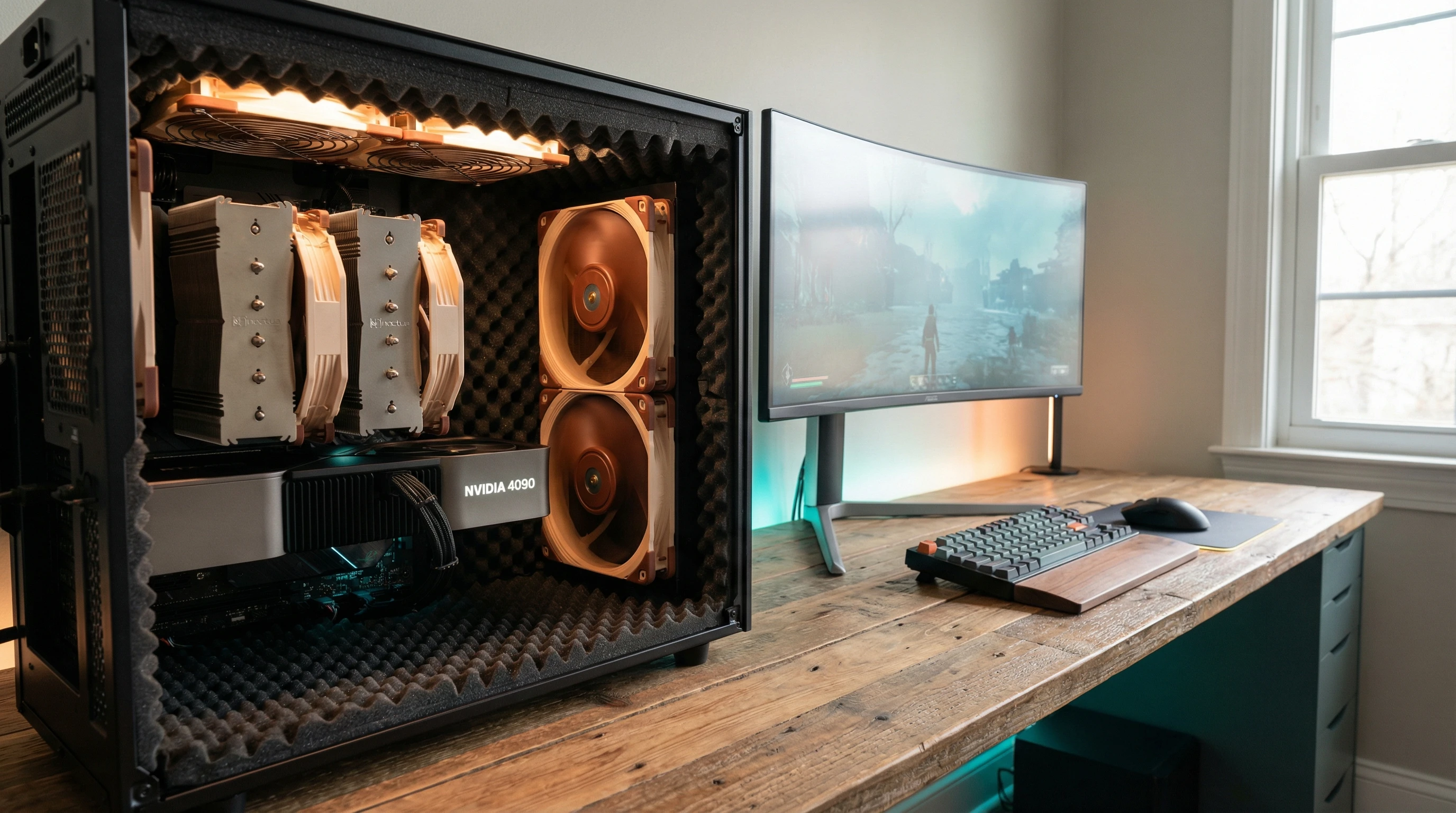
- Start with the Right Case: Cases with built in sound dampening foam and minimal ventilation holes help keep internal noise from escaping. These cases also usually come with carefully placed padding and heavier build materials for extra silence.
- Switch to SSDs: Solid state drives make zero noise compared to old school spinning hard drives. For your main OS and games, SSDs are a clear win for silence and speed.
- Pick Quiet Fans and Coolers: Noctua, be quiet!, and Arctic all offer low noise fans and CPU coolers. Larger fans move more air at slower, quieter speeds.
- Choose Passive or Semi Passive Graphics Cards: Some new GPUs include fans that turn off during light loads, or even passive options for media cards.
- Go for a Semi Passive Power Supply: Many modern PSUs stop their fan at low or medium loads, keeping your PC silent during normal use. A great feature for working or gaming late at night.
- Control Fan Curves in BIOS: Setting custom fan profiles means your system won’t spin up fans unless temps actually get hot. This is one of the quickest ways to make a big difference.
How to Make Your PC Whisper-Quiet
There are several tweaks and upgrades that make a surprising difference in bringing noise levels down:
- Replace Stock Fans: The fans that ship with many cases aren’t exactly quiet. Swapping them out for premium, low decibel options cuts baseline noise a lot. Sometimes all it takes is just a couple of quieter fans and you notice your PC blends right into the background.
- Add Rubber Grommets and Dampening Pads: These cut down on vibrations from fans and drives, stopping them from echoing through the case and amplifying sound. Many cases already come with these extras preinstalled, but you can easily add them too.
- Consider Water Cooling: All in one (AIO) or custom water-cooling systems can be run quieter than air in some cases because big radiators allow for lower fan speeds. Just be sure to research pump noise, since louder pumps can be distracting in a silent setup.
- Cut Down on Drive Noise: If you use a hard drive for bulk storage, mount it with rubber, or put it in a dampened caddy or case bay. This simple swap can drop a lot of hum, especially during heavy file transfers.
- Seal Unused Vents: Cover unused case vents with foam or dust filters to block noise leaks, but keep airflow moving to where it’s needed for cooling.
Small upgrades here and there, like isolating components with rubber or controlling fan speeds, build up to a huge reduction in total noise from your system. You can aim for a setup where your PC is basically silent except for heavy gaming marathons.
Important Considerations Before Building
There are a couple of extra points to keep in mind before buying parts for a silent build. These include:
- Thermal Limits: Quiet builds often mean reduced airflow compared to more open, noisy cases. You’ll need to balance silence with cooling and make sure your parts won’t overheat just to keep things quiet. Always watch system temps during stress tests to be safe.
- Budget: Silent PC components sometimes cost a bit more because of premium materials or thoughtful designs. For most gamers, the extra outlay for quality coolers and fans pays off with less noise and more comfort for years to come.
- Upgrade Paths: Some silent parts may limit how much hardware you can install later. For example, passive cooled GPUs mostly come in midrange cards, not top end ones. If you plan to upgrade to beefier graphics down the line, keep this in mind.
- Space and Layout: Silent cases are often a bit larger to allow good airflow even with dampening materials and slow spinning fans. Make sure you have room under your desk or in your setup for a slightly bulkier case if you want optimal silence.
I always recommend checking user reviews that mention noise levels before buying a component. Forums like Reddit’s /r/build a pc and reviews on Silent PC Review are super useful for tracking down real-world noise impressions from others who’ve built similar systems. You’ll find new tips and pitfalls others have run into with specific quiet PC hardware.
How to Choose a CPU for a Silent Gaming PC
The CPU is one of the main heat sources in a gaming system, so picking the right processor helps keep things quiet. Here are some tips that consistently work:
- Go for Efficient CPUs: Look for modern chips that run cool and sip power, such as AMD Ryzen models (especially the nonX versions), or Intel’s latest Core processors with a low TDP (Thermal Design Power) rating. Energy efficient chips generate less heat, so cooler fans run more slowly and quietly most of the time.
- Match with a Quiet Cooler: Even a midrange processor can stay cool with a big, slow spinning tower cooler. The cooler you keep your CPU, the more silent the system overall. Popular silent coolers are easy to install and can handle modern gaming CPUs with zero fuss.
- Skip Overclocking: Pushing CPUs well above their rated speeds creates extra heat that almost always forces higher fan speed and more noise. Stick to stock speeds or use auto boost; it’s more than enough for most modern games and keeps your PC whisper quiet.
- Consider Integrated GPUs (IGPUs) for Non-Heavy Gaming: Modern integrated graphics (like AMD’s Ryzen G chips or Intel’s newer IGPUs) can manage light gaming without any dedicated GPU noise. Perfect if you play indie games or do basic creative work but don’t need a separate graphics card.
For most quiet PCs, I stick with a six to eight core chip, paired with a trusted tower cooler from Noctua or be quiet!. This matches efficient performance with nearly silent operation, making gaming sessions much more chill.
Recommended Silent Components
- CPU Cooler: Noctua NHU12S or be quiet! Pure Rock 2
- Case: Fractal Design Define series, be quiet! Silent Base
- Fans: Noctua NFS12A FLX, be quiet! Silent Wings 4
- Power Supply: Corsair RMx Series (semi passive), Seasonal Focus PX/PX Prime
- Graphics Card: Models with 0 dB fan modes such as ASUS STRIX, or passive cards for lower power requirements
- SSDs: Samsung 980, WD Blue SN570, Crucial MX500 (all silent, thanks to no moving parts)
Common Questions about Silent Gaming PCs
Can you really build a Silent PC for Gaming?
With the right components and a little patience, yes. It’s mostly about balancing thermal needs and quiet operation. Gaming PCs no longer have to sound like jet engines, even if you play graphically intense titles or work on creative projects.
How do I make my PC silent?
Replace noisy fans, use SSDs, upgrade to a bigger CPU cooler, and set careful fan profiles. Swapping your current case or adding foam padding also works wonders for cutting noise.
Will my silent PC get too hot?
If you plan and test things properly, it won’t. Just monitor your system’s temperatures while gaming to be sure. Modern quiet coolers and smart airflow setups keep things in a safe range for today’s hardware.
Is fanless, totally silent better than just quiet?
Not always. Fanless builds can run warm and aren’t great for more powerful hardware. A good system with slow moving fans will be about as quiet in regular use and will be much better at cooling for long stretches of time.
Final Thoughts
It’s totally possible to enjoy your games without the PC in the corner sounding like it’s getting ready for takeoff. Picking efficient components, adding quiet cooling gear, and making a few smart tweaks can turn any regular system into a silent, powerful machine. While going completely silent can take some extra research or extra cash, making just a few focused upgrades cuts the noise right away. A silent gaming PC might not be completely “silent,” but you’ll be amazed at how relaxed and focused your gaming sessions feel when you’ve switched things up. Give it a shot and see just how satisfying quiet PC gaming can be.